RentCafe Resident
- 4.8
- Rating
- 1.00M
- Installs
- Free
- Price

 Analysis by App-foxy
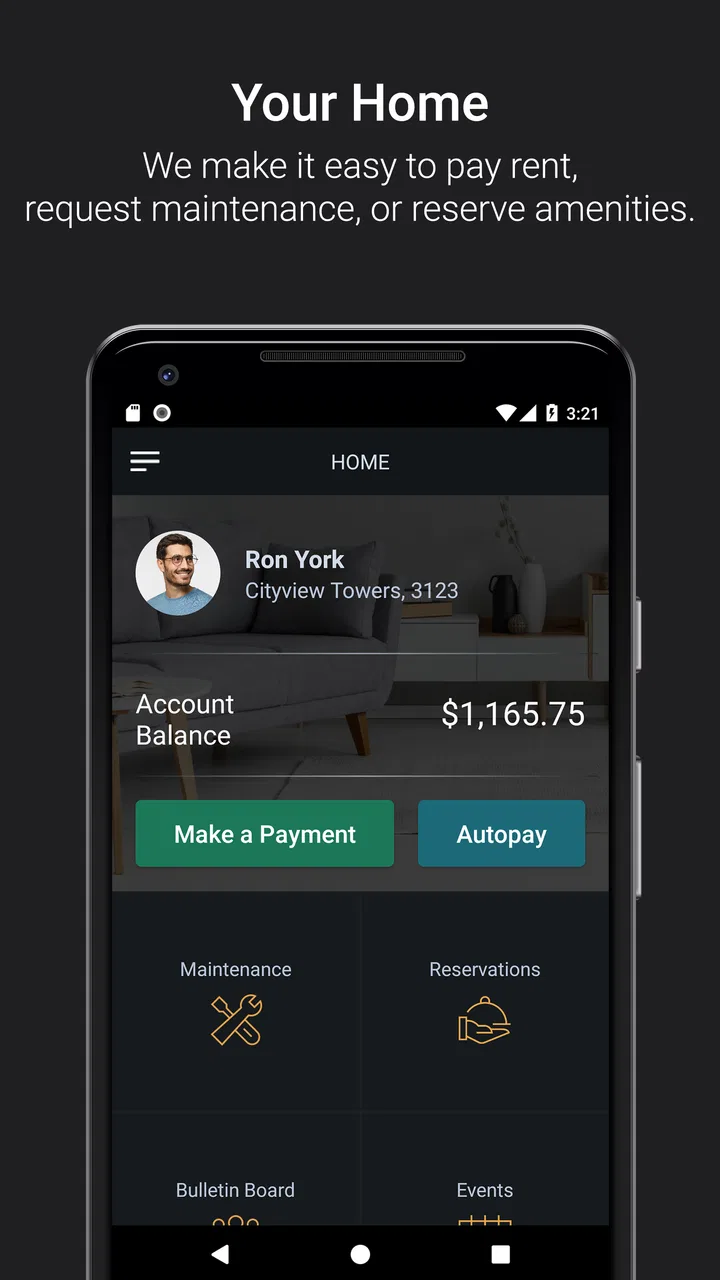
RentCafe Resident is the kind of lifestyle app I appreciate most when it removes small chores from an already busy day. Instead of searching through emails, calling the leasing office, or trying to remember where a payment instruction was stored, I can use one resident-focused place for everyday apartment tasks. Its main purpose is practical: paying rent, sending work-order requests, and keeping up with the parts of renting that are easy to postpone.
I see it as a companion to a rental home rather than a general property-search app. That distinction matters. It is built for people who already live in a participating community, so its usefulness depends on the services and setup connected to that residence. When everything is available, the experience feels much more organized than juggling paper notices, separate payment methods, and phone calls. When a particular request still needs staff involvement, the app does not magically replace the property team; it mainly gives you a cleaner way to start and track the process.
Developed by Yardi Systems, this free Lifestyle app has been available since December 26, 2013. It is rated for Everyone, works on Android 8.0 or later, and the current version is 26.2.1. Its 4.7 average from around 156 thousand ratings and more than a million installs suggest that the basic resident workflow works well for a large audience. I would not treat that rating as a promise that every building offers an identical experience, though. Your community’s configuration is just as important as the app itself.
You May Also Like

 Blood Strike: 2.5 Anniversary
Blood Strike’s Loadouts Turn Every Drop Into a Tactical Gamble
A close look at Blood Strike’s custom loadouts: how fast access to signature weapons reshapes its battle royale rhythm, rewards preparation, and narrows the gap between fights.

 Pandora - Music & Podcasts
Pandora’s Music Is Easy to Start, but Harder to Recover
Pandora’s strength is its low-effort path from a seed to a station. Its weak spot is how much confidence it asks you to place in connection, setup, and quiet recovery.

 8 Ball Pool
 Is Built on Rivalries, Rematches, and Routine
A close look at the rivalries, rematches, shared routines, and unanswered safety questions that turn a quick pool match into a persistent mobile community.

 Samsung Music
’s Quiet Strength Is Playing What You Already Own
Its reach comes less from spectacle than from dependable access to a personal library. That simplicity is both the app’s strongest retention engine and its ceiling.

 AccuWeather: Weather Radar
AccuWeather Review: A Quick, Clear Forecast for Everyday Decisions
For everyday plans, the best forecast is the one you can understand quickly. AccuWeather makes rain timing, radar, and local conditions easy to act on, with a few trade-offs.

 Hill Climb Racing
Why Hill Climb Racing Still Turns Crashes Into One More Run
A tiny car, a bumpy hill and one more upgrade: Hill Climb Racing keeps resurfacing because its simple chaos makes every near-miss feel personal.
More From Our News Desk



How I use RentCafe Resident in a normal week
I use RentCafe Resident as a quick checkpoint rather than waiting until a bill or repair becomes urgent. A short weekly review helps me catch a misplaced account detail, remember an open request, and decide whether anything needs a direct follow-up with the property team. That routine is most useful when I keep it focused, which is why I start with the few tasks that can actually change during the week.
The baseline workflow is deliberately simple
My first recommendation is to treat the app as a routine tool, not something to open only when a problem becomes urgent. After signing in, I would check the resident dashboard for the tasks that matter most: the next rent payment, any open maintenance request, and notices or community information that may need attention. That quick check gives the app a clear role in my day instead of turning it into another notification-heavy application.
For rent, the useful habit is to handle the payment when I am calm and have time to review the details. I would confirm the amount and the selected payment method before submitting anything, then keep the in-app confirmation or receipt available until the transaction is comfortably behind me. That is a better workflow than paying while distracted and later wondering whether the action went through. The app makes the payment step more accessible, but basic checking still belongs to the user.
Maintenance requests are where the mobile format feels especially natural. If a sink begins leaking or an appliance behaves strangely, I can describe the issue while the details are fresh instead of waiting until office hours to explain it from memory. I would write the location first, describe what happened, and mention whether the problem is intermittent or constant. A short, specific request is more useful than “something is broken.” If the app allows the relevant details for my community, I would include them before sending the request.
A realistic example is a bathroom fan that stops working on a Sunday evening. I can submit the request immediately, explain that the fan is silent even when the switch is on, and note whether there is any moisture or other concern. That creates a written record and avoids relying on a voicemail. I would still follow any emergency instructions from the property, because a resident app is not a substitute for urgent assistance when there is active flooding, a serious safety issue, or another situation that should be reported through a direct emergency channel.
What makes the app more useful than a phone call
The strongest advantage is context. A call requires me to repeat my name, unit information, and the reason for contacting the office. A resident portal can associate the request with my account, which reduces that repetition and gives me a place to revisit the issue later. That is particularly helpful when I have several small requests over a month and do not want to remember which ones I already reported.
It also creates a more disciplined record of household administration. I can use the app as a checklist: submit the request, review its status when needed, and look back at what I reported. That does not guarantee a faster repair, since response time depends on the community and its staff, but it does make my side of the process clearer. For renters who often lose emails or forget conversations, this alone can justify keeping the app installed.
There is another practical benefit for roommates and partners. Rather than assuming someone else paid rent or reported a problem, we can agree on one routine: one person submits the action, then shares the confirmation or tells the other person that it is complete. The app does not solve household communication by itself, but a centralized resident account is less ambiguous than scattered messages.
Settings and account details worth checking early
I would spend a few minutes reviewing the account and notification settings after installation. The important goal is not to turn on every alert; it is to make sure useful reminders are visible without allowing the app to become background noise. Payment-related notices and updates about a submitted work order are the kinds of alerts I would prioritize. If the app offers community announcements, I would decide whether I want them immediately or prefer to check them manually.
I would also verify that the resident profile points to the correct property and unit before submitting a maintenance request. This sounds obvious, but it is an easy detail to overlook after moving, changing units, or using an account that was created before a lease update. A wrong unit association can create unnecessary confusion for the office and delay the person who actually needs help.
Payment settings deserve a separate review. I would check the saved method, the account information, and the payment timing rather than assuming that an earlier setup is still correct. If my bank account or card changes, I would update it before the next due date. I would also avoid waiting until the final moment, because a login issue, an expired payment method, or a temporary connection problem is much easier to handle during the day than late at night.
One small but valuable habit is to keep contact information current. If the property needs to reach me about access for maintenance or a building notice, an outdated phone number or email can make an otherwise straightforward request harder to complete. The app is most effective when the account behind it reflects how I actually live in the apartment.
Repeatable shortcuts that save more time than rushing
The fastest experienced workflow is not tapping quickly; it is preparing information before it is needed. For maintenance, I keep a short mental template: where is the problem, what exactly happens, when did it begin, and is there any immediate risk? Using those four points produces a better request on the first attempt and reduces follow-up questions. If the issue changes, I can add an update rather than creating multiple vague tickets.
I also separate routine tasks from urgent ones. Rent payment is something I schedule into my personal monthly routine. A work order is something I submit as soon as I can describe it accurately. Community notices are something I review during a regular check. This division prevents the app from becoming a place I open only when I am already stressed.
Another useful pattern is to check the status of an existing request before submitting a duplicate. Duplicate reports can make the history harder to understand and may not speed up the repair. If the original request is still open, I would add relevant information through the available process or contact the property directly when the matter requires personal follow-up. The app works best when it is used as a clear record, not as a button to press repeatedly.
For people who share a home, I would establish one simple rule: decide who handles each task and where the confirmation will be kept. That avoids two payments, two maintenance reports, or no action because both people assumed the other had done it. The app can support that habit, but the household still needs an agreement.
Where the mobile experience has real limits
RentCafe Resident is not equally valuable to every renter. If your property does not expose a particular service through its resident setup, the related workflow may not be available in the way you expect. I would therefore judge the app by what my own community has enabled, not by assuming that every RentCafe resident sees the same options. This is the most important limitation for someone deciding whether it will replace an existing property portal.
The app also cannot control the speed or quality of maintenance work. A beautifully submitted request still depends on office processes, technician availability, building access, and the seriousness of the issue. I like having a digital trail, but I would not use that trail as a reason to wait when a problem is dangerous or worsening. In those cases, I would follow the property’s direct emergency instructions.
Another trade-off is that a mobile portal can make administrative tasks feel easier without making them less important. A few taps can submit a payment, but I still need to check the amount and confirmation. A short form can report a leak, but I still need to describe the location and urgency. Convenience improves the workflow; it does not remove responsibility.
I would also skip it as a primary tool if I am looking for apartment discovery, broad rental comparisons, or a general home-management platform. Its value begins after the resident relationship exists. Someone who wants a marketplace, moving planner, budgeting app, or universal maintenance organizer will likely need a different category of product.
How it compares with email, paper, and separate payment tools
Compared with email, the resident app has a clearer connection to the apartment itself. Email is flexible and familiar, but messages can disappear into an inbox, lose the relevant unit context, or become difficult to search later. A resident-focused workflow is better for recurring tasks because rent and maintenance are grouped around the home rather than mixed with everything else.
Compared with calling the office, the app is more convenient for non-urgent requests outside office hours. I can write down the details when I notice them instead of waiting to remember them later. A phone call may still be better when the situation is complicated, sensitive, or urgent, or when I need an immediate answer from a person. The two methods are not enemies: I would use the app for a clear record and direct contact when conversation matters.
Compared with a separate banking app, RentCafe Resident has a narrower but more relevant purpose. A bank app may offer broader payment history and account tools, while the resident app connects the action to the rental relationship. For me, that connection is useful when I want to handle rent and then move directly to a work order or community notice without switching contexts.
Paper notices still have one advantage: they do not depend on a login, a device, or a working connection. I would not throw away important lease documents simply because the app is convenient. The best setup is a practical combination: keep formal records where they belong, and use the app for repeatable resident actions and current communication.
Questions I would consider before relying on it
If I were moving into a new community, I would first ask whether that property uses RentCafe Resident and which resident services are active. Installation alone does not create a connection to a building. I would also make sure I know how the property wants urgent maintenance and after-hours emergencies reported, since those instructions may require a different route.
I would want to know whether my preferred payment method is supported before making the app my only payment routine. The sensible approach is to open the payment area early, review what is available, and complete setup well before the due date. That gives me time to use the property’s alternative process if the setup does not fit my situation.
I would also ask how I can confirm that a request was received and what to do if the status does not change. A resident app can provide a useful record, but I would not assume that silence means the issue is being handled. If a repair is time-sensitive, I would keep the request details and contact the property through its stated channel.
Finally, I would consider whether I am comfortable managing rental information on my phone. The app is convenient, but I would protect the device, avoid sharing login details casually, and review confirmations before closing the session. Those are simple habits, yet they matter more than any shortcut.
My verdict after building a resident routine
I recommend RentCafe Resident to renters whose communities actively use it, especially people who want one practical place for rent payments, work orders, and resident communication. The free price makes it easy to try, and the Everyone age rating makes it approachable for a broad household audience. Its strongest quality is not flashy design; it is the way it turns apartment administration into repeatable steps.
The real advantage is a dependable habit, not merely having another app on your phone. Check the account after moving in, review payment details before they become urgent, describe maintenance issues with useful specifics, and look at existing requests before creating duplicates. Those habits make the service more effective than simply opening it whenever something goes wrong.
My balanced view is that RentCafe Resident is a strong resident portal, not a universal solution for every rental problem. It cannot replace emergency channels, property staff, lease documents, or a broader banking tool. It may also feel limited when a community has not enabled the features you need. But for the everyday renter who wants fewer scattered tasks and a clearer record of apartment business, it is a sensible companion and one I would keep installed when my property supports it.
With a 4.7 average from around 156 thousand ratings, over a million installs, and a current version of 26.2.1 supporting Android 8.0 and later, it has the reach and maturity I expect from an established rental-service app. I would choose it for convenience and organization, while keeping realistic expectations about community-specific features and response times. Used that way, it does exactly what I want from a resident app: it makes ordinary rental responsibilities easier to handle without pretending that every part of renting can be automated.
FAQs for RentCafe Resident
01What is RentCafe Resident, and how does it work?
RentCafe Resident is a mobile application designed for residents of properties that use the RentCafe platform. It allows users to manage their rental experience efficiently by providing features such as online rent payments, maintenance requests, and community announcements. Once you download and log into the app, you can access these services anytime, enhancing your residential convenience.
02Can I pay my rent through the RentCafe Resident app?
Yes, the RentCafe Resident app enables you to pay your rent directly from your mobile device. You can set up one-time payments or schedule recurring payments to ensure timely transactions. The app supports various payment methods, including credit/debit cards and bank transfers, providing flexibility and security in managing your rent payments.
03How secure is my personal information on the RentCafe Resident app?
The RentCafe Resident app prioritizes user security by implementing robust encryption protocols to protect your personal and financial information. The app complies with industry-standard security measures, ensuring that your data remains confidential and secure. Always make sure to use a strong password and enable two-factor authentication if available to enhance security further.
04Can I submit maintenance requests through the app?
Absolutely. The RentCafe Resident app allows you to submit maintenance requests directly from your smartphone. You can describe the issue, attach photos, and track the status of your request in real-time. This feature streamlines communication with your property management team, ensuring that repairs and maintenance issues are handled efficiently.
05Is the RentCafe Resident app available for both Android and iOS devices?
Yes, the RentCafe Resident app is available for download on both Android and iOS platforms. You can find the app on the Google Play Store for Android devices and the App Store for iOS devices. Ensure your device meets the app's system requirements for a smooth installation and user experience.
Pros
- User-friendly interface for easy navigation.
- Secure online rent payment options.
- Real-time maintenance request tracking.
- Community updates and event notifications.
- Accessible on both Android and iOS platforms.
Cons
- Limited customization for notifications.
- Occasional login issues reported.
- Customer support response can be slow.
- Some features require strong internet.
- Limited offline functionality.

RentCafe Resident
Gallery